Turn Your Ideas into High-Quality AI Content in 2026 (Complete Blogger's Guide)
Learn how to turn simple ideas into high-quality blog posts using AI. This step-by-step guide covers brainstorming, prompts, content planning, editing, SEO, and practical workflows for bloggers in 2026.
One of the biggest challenges bloggers face isn't writing—it's turning a simple idea into content that people actually want to read.
We've all had moments where a great topic comes to mind, but when it's time to write, we don't know where to begin. This is where AI has become one of the most valuable tools for bloggers in 2026.
However, there's a common misconception that AI can do everything for us. In reality, AI is much better at helping us organize, improve, and expand our ideas than replacing our creativity.
In this guide, I'd like to share the workflow I use to transform a basic idea into a complete, useful, and engaging article with the help of AI.
Step 1: Start with a Simple Idea
Every great article starts with one simple idea.
For example:
- AI for bloggers
- Passive income
- ChatGPT prompts
- SEO mistakes
- AI image generation
- Affiliate marketing
- AI news
Don't worry if your idea seems too broad.
The goal is simply to capture it before you forget it.
I keep a notebook where I write down every idea that comes to mind. Even a single sentence can later become a detailed blog post.
Step 2: Ask AI to Expand Your Idea
Instead of asking AI:
Write an article about AI blogging.
Try something more specific.
Example prompt:
Act as an experienced blogging mentor.
Help me expand the topic "AI Blogging" into 20 useful article ideas for beginners.
Include practical, evergreen, and trending topics.
The better your prompt, the better your results.
AI is excellent at brainstorming.
Step 3: Choose One Specific Angle
Broad topics rarely perform well.
Instead of writing:
AI Blogging
Choose:
Specific articles answer specific questions.
Step 4: Research Before Writing
One mistake beginners make is asking AI to write before understanding the topic.
Instead:
Research first.
Questions I ask AI include:
- What problems do beginners face?
- What questions are commonly asked?
- What mistakes do people make?
- What trends are happening in 2026?
This gives me direction before writing.
Step 5: Create an Outline
Never begin with a blank page.
Ask AI to create an outline first.
Example:
Create a detailed outline for this topic.
Use H2 and H3 headings.
Arrange everything in logical order.
The outline becomes the roadmap for your article.
Step 6: Expand One Section at a Time
Avoid asking AI to generate the entire article in one prompt.
Instead:
Write section by section.
Example:
Introduction
↓
Problem
↓
Solution
↓
Tutorial
↓
Examples
↓
Common Mistakes
↓
FAQs
↓
Conclusion
This produces much better quality.
Step 7: Add Your Own Experience
This is the most important step.
AI can explain.
Only you can share experience.
Instead of saying:
"ChatGPT is useful."
Write:
"I used ChatGPT to create blog outlines for an entire month. It reduced my planning time from nearly two hours to around thirty minutes."
Real examples build trust.
Step 8: Ask AI to Improve Readability
After finishing your draft, ask AI:
Rewrite this article using simple English.
Shorten long sentences.
Remove repetition.
Improve readability.
Keep the original meaning.
This often makes the article much easier to read.
Step 9: Create Helpful Extras
Great articles don't stop after the conclusion.
Use AI to generate:
- FAQs
- Key Takeaways
- Checklists
- Tables
- Summaries
- Social media captions
- Email newsletters
One article can become multiple pieces of content.
Step 10: Verify Every Important Fact
AI isn't perfect.
Always check:
Statistics
Dates
Company names
Product pricing
Recent updates
Never assume AI is always correct.
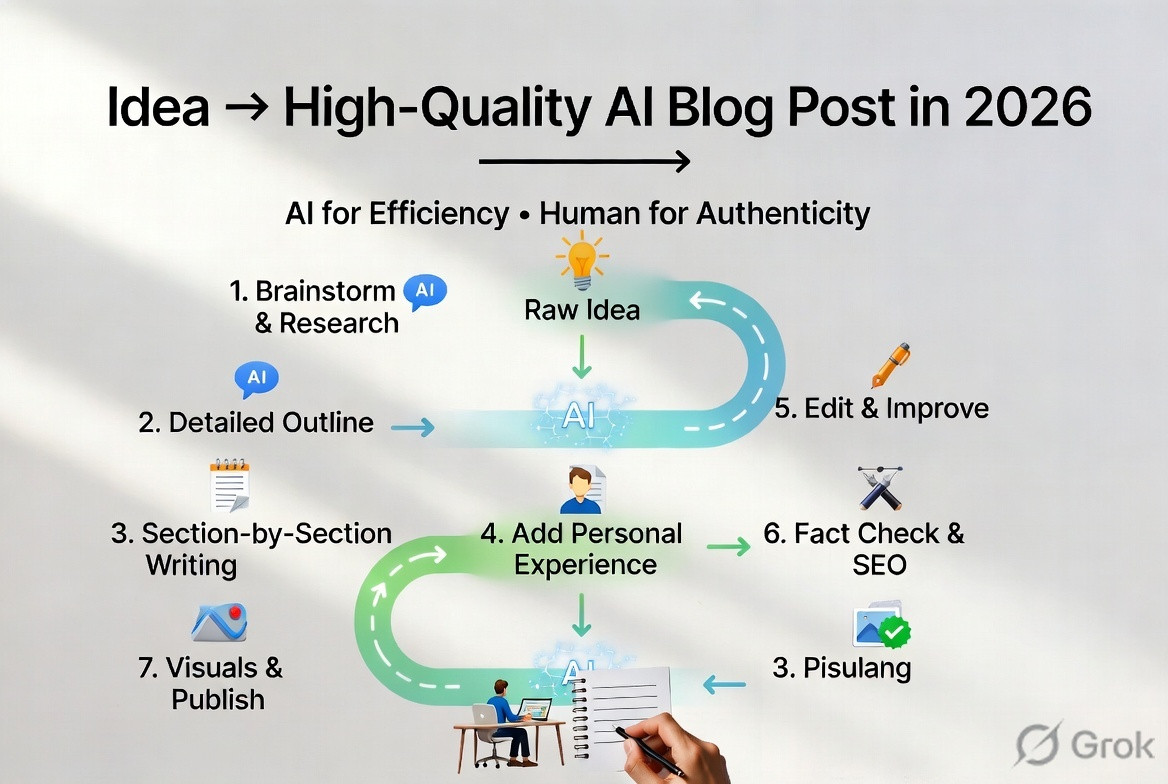
A Complete AI Blogging Workflow
Here's the workflow I currently follow.
Idea
↓
Research
↓
Outline
↓
Write
↓
Expand
↓
Add Personal Experience
↓
Edit
↓
Fact Check
↓
SEO Optimization
↓
Images
↓
Internal Links
↓
Publish
This workflow has helped me stay organized and consistent.
Useful Prompt Examples
Prompt 1 – Brainstorming
Give me 30 unique blog ideas related to AI blogging.
Separate them into Beginner, Intermediate, and Advanced topics.
Prompt 2 – Outline
Create a detailed outline with headings and subheadings.
Make it beginner-friendly.
Prompt 3 – Improve Content
Rewrite this article using conversational language.
Avoid robotic wording.
Keep paragraphs short.
Explain difficult concepts simply.
Prompt 4 – FAQs
Generate 10 FAQs beginners might ask after reading this article.
Prompt 5 – SEO
Suggest:
SEO title
Meta description
Slug
Internal linking ideas
Related keywords
These AI prompts save a tremendous amount of time.
Common Mistakes Bloggers Make
I've noticed several common mistakes.
- Asking AI to do everything.
- Publishing the first draft.
- Not checking facts.
- Copying competitor articles.
- Ignoring formatting.
- Writing without understanding the topic.
- Depending on AI for opinions.
AI should support your work, not replace your thinking.
Create Content That Solves Problems
Ask yourself:
What problem does this article solve?
Readers don't search for articles.
They search for solutions.
For example:
Instead of:
ChatGPT
Write:
How ChatGPT Helps Bloggers Save Time?
That's much more useful.
Don't Forget Visual Content
Today's readers appreciate visuals.
Use AI to create:
- Feature images
- Flowcharts
- Infographics
- Comparison tables
- Icons
- Social media graphics
Visuals improve engagement and make complex topics easier to understand.
Repurpose Every Article
One blog post can become:
- 5 social media posts
- 1 email newsletter
- 10 short tips
- A LinkedIn article
- A forum discussion
- A YouTube script
- An infographic
- A checklist
- A presentation
AI makes repurposing incredibly easy.
Measure Your Results
After publishing, don't just move on.
Review:
- Traffic
- User engagement
- Comments
- Search rankings
- Time on page
Use those insights to improve future articles.
My Personal Routine
Here's my typical workflow whenever I write.
Morning:
Collect ideas.
Research.
Create outlines.
Afternoon:
Write section by section.
Evening:
Edit.
Add screenshots.
Optimize SEO.
Publish.
This routine helps me avoid rushing and gives me time to improve the final draft.
The Human Touch Still Wins
AI is an amazing assistant, but readers connect with people.
What makes your content memorable isn't perfect grammar—it's your experience, your opinions, your examples, and the way you explain things.
When someone reads your article, they should feel like they're learning from another person, not reading a machine-generated document.
That's why I always spend time adding personal observations and practical advice before publishing.
Final Thoughts
In 2026, creating outstanding content isn't about asking AI to write everything for you. It's about learning how to work alongside AI. Let it help you brainstorm, organize, edit, and optimize, but always make sure the final article reflects your own voice and knowledge.
The bloggers who succeed over the next few years won't necessarily be the ones using the most AI tools. They'll be the ones who combine AI efficiency with human creativity, originality, and trust.
Whenever I start a new article, I remind myself of one simple formula:
Idea + Research + AI Assistance + Personal Experience + Careful Editing = Outstanding Content.
If you focus on helping your readers first, AI becomes one of the best productivity tools you'll ever use.
I'd love to hear how everyone else approaches content creation.
- How do you turn a simple idea into a finished article?
- Which AI tool helps you the most during the writing process?
- Do you create your outline first or let AI suggest one?
Let's share our workflows and learn from each other.
Keyword Tags:
AI Content Creation, AI Blogging, ChatGPT, Content Writing, AI Writing, Prompt Engineering, Blogging Tips, Content Strategy, SEO Writing, AI Productivity, Content Marketing, Digital Marketing, Blog Growth, AI Tools, Content Planning, AI Workflow, Evergreen Content, Creative Writing, Blogging Guide, AI for Bloggers, AI Forum, AI Webloggers